Novadesko and Claude: your invoicing answers in the chat
You run your business in Novadesko and you think things through in Claude. The official MCP connector makes the two talk: ask for your September revenue, the list of overdue invoices or a quote ready to send, and Claude fetches the answer from your own account. No shared password, no exports, and nothing gets saved without your approval.
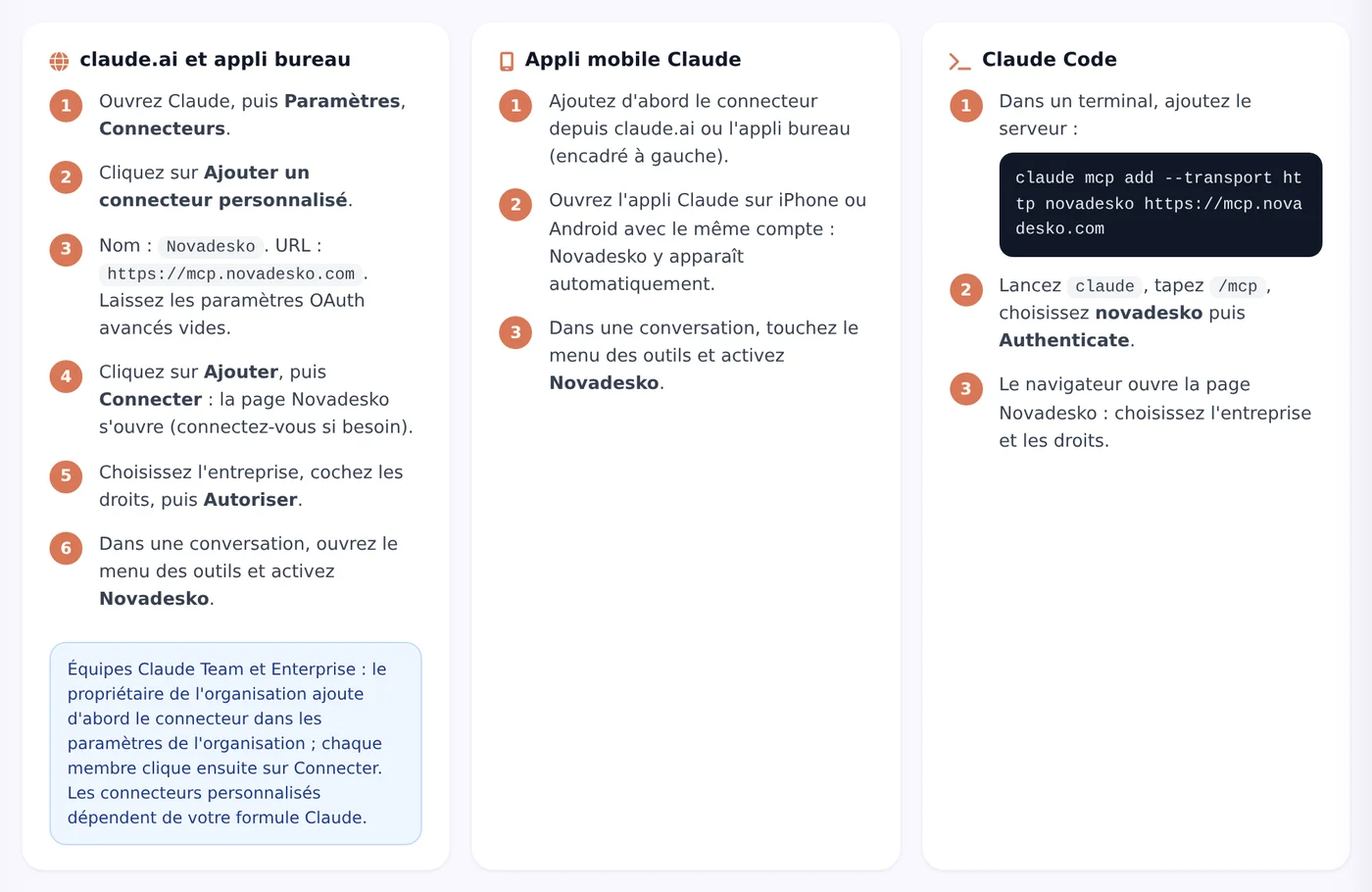
On claude.ai, open Settings then Connectors, add a custom connector named Novadesko with the address https://mcp.novadesko.com, and authorise access to your company. Claude can then read your invoicing data and prepare quotes, invoices or reminders, which you confirm before anything is saved.
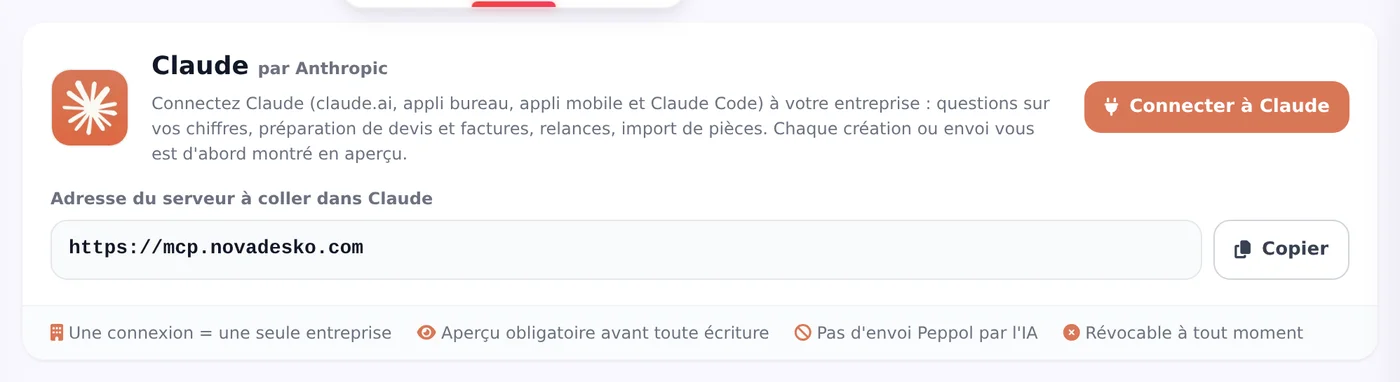
Connector address
https://mcp.novadesko.com, the same for Claude, ChatGPT and Gemini
Connection
OAuth 2.1 with PKCE, automatic client registration, never a password
Price
No Novadesko surcharge today, the Claude subscription is paid to Anthropic
Control
A preview valid for 30 minutes and an explicit confirmation before every write
Connect Claude in four steps
On claude.ai and in the desktop app the path is identical, and it takes about two minutes.
Step 1
Open the connectors
In claude.ai or the Claude desktop app, open Settings, then Connectors.
Step 2
Add Novadesko
Choose Add custom connector, name it Novadesko, paste the address https://mcp.novadesko.com and confirm with Add.
Step 3
Authorise access
Click Connect: a Novadesko page opens. Pick your company, tick the rights you want to grant, then press Authorise.
Step 4
Activate and test
Turn Novadesko on in the conversation's tools menu and ask your first question.
Mobile, Claude Code, Team and Enterprise
The connector follows your Claude account, not your device.
Claude mobile app
Nothing to set up: the connector you added on claude.ai simply shows up on your phone.
Claude Code
In the terminal, a single command is enough. Then run /mcp and pick Authenticate to sign in.
claude mcp add --transport http novadesko https://mcp.novadesko.com
Claude Team and Enterprise
The organisation owner adds the connector for the team first. Custom connectors depend on the Claude plan chosen at Anthropic.
What Claude can do with your account
Once connected, Claude reads your invoicing the way you would: revenue for a period with a comparison, your best customers and products, unpaid invoices, SMS credits, your Peppol status, the sync with your accounting package (WinAuditor, WinBooks Connect, Horus and others) and your bank, plus analyses of VAT, purchases, fixed costs, projections or stock. It searches and reads your customers, suppliers, documents and products.
It also prepares a lot for you: a customer or supplier record, a quote, an invoice, a purchase order, a receipt, a proforma, a credit note, the conversion of a document, a received payment, general terms, the import of a purchase invoice it has read itself, a Peppol request to the team, a support ticket, an email, or a reminder by email or SMS.
Four prompts to try
What is my September revenue compared with last year?
Which invoices are overdue?
Prepare a quote for Smith Joinery: two interior doors, fitted.
Send an email reminder for everything unpaid for more than 30 days.
The same tools power Nova AI, the assistant built into Novadesko itself: what Claude does here, Nova AI does inside the application.
One company, chosen rights, never a password
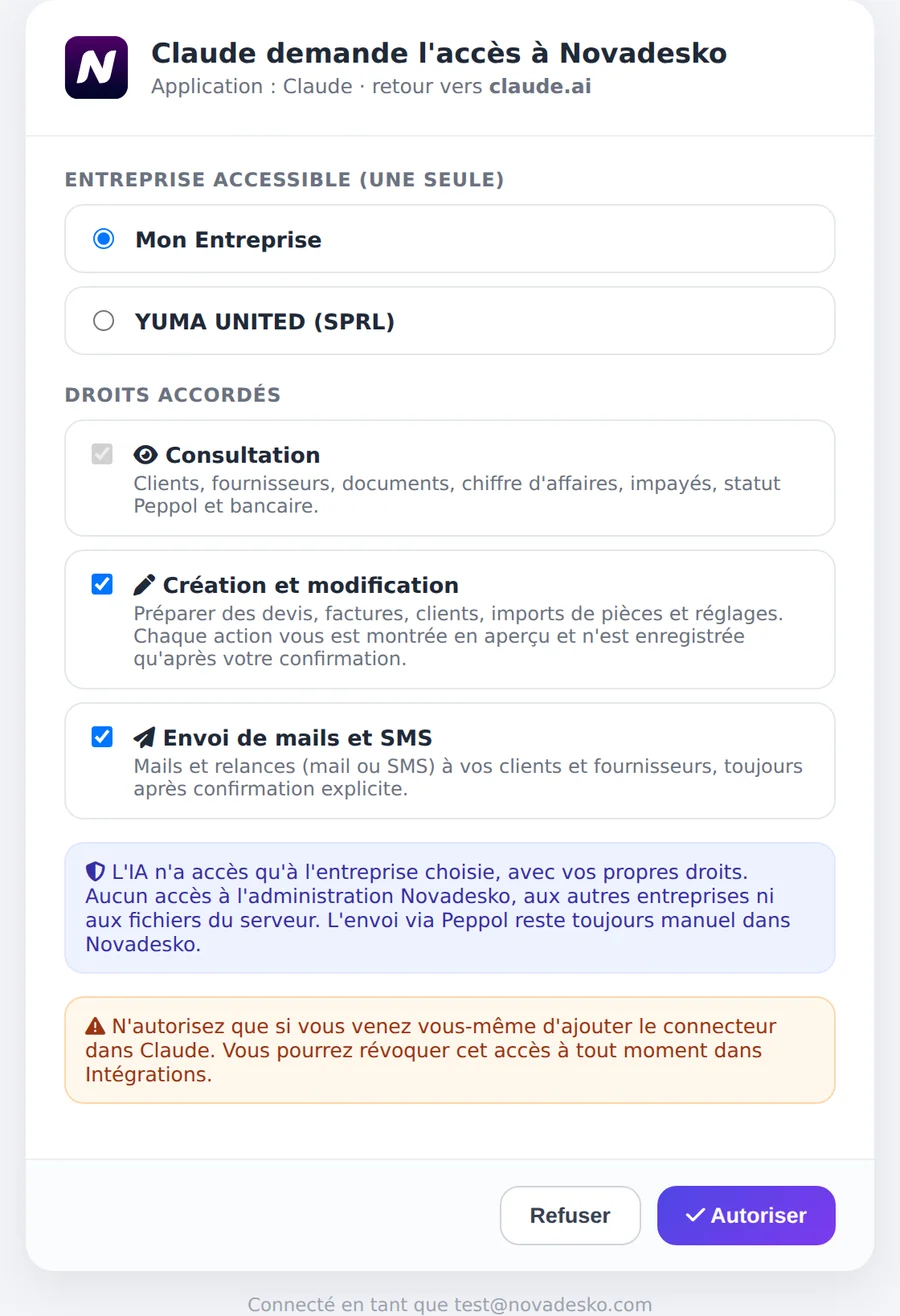
When you connect, a Novadesko page opens in your browser. There you pick a single company and the rights Claude will receive. Your password stays with you: the connection uses OAuth 2.1 with PKCE and the client registers automatically.
Right
Scope
Granted
Read
View figures, documents and records
Always
Create and edit
Prepare quotes, invoices and records
Only if you tick it
Send emails and SMS
Reminders and messages to your customers
Only if you tick it
A preview before every write
Claude never touches your account directly. Every creation, change or sending first produces a preview, often a PDF, valid for thirty minutes. You check it, you approve it, and a single-use confirmation token carries out the action. The legal invoice number is only assigned at that very moment.
What Claude never does
Send an invoice through Peppol: Peppol sending remains a manual step inside Novadesko.
Access another company than the one authorised, or reach the admin area and your files.
Delete your account.
Save or send anything without your explicit confirmation.
Activity log, revocation and privacy
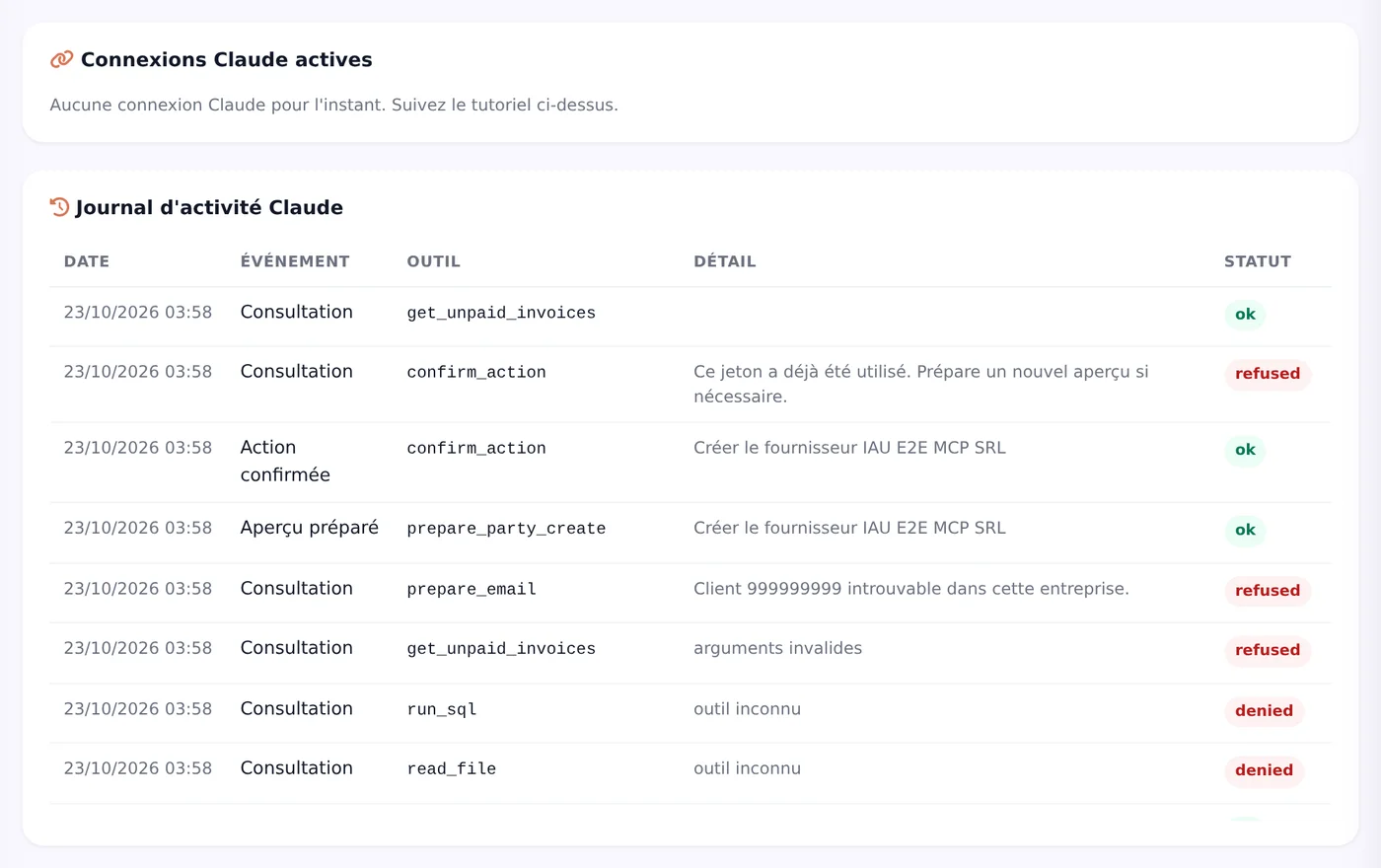
Every connection has its own activity log, visible in Novadesko under Integrations. Second thoughts? The Revoke button cuts access immediately.
Novadesko does not store your conversations: it only receives the tool requests Claude sends over. The conversation itself stays with Anthropic, under its own terms.
Healthy usage limits
Limit
Value
Calls per minute per connection
120
Calls per minute per company
400
Confirmations per hour
30
What about the subscription?
Today the connection requires no particular plan and no surcharge. Claude simply follows the rules of your Novadesko plan: if a feature is not included, it says so politely and names the smallest plan that contains it, price included. The full plan overview lives on the pricing page.
The subscription to Claude itself is paid to Anthropic, not to Novadesko.
Does connecting Claude to Novadesko cost anything?
No. Today it requires no particular plan and no Novadesko surcharge. Claude applies the rules of your plan: a feature that is not included is politely declined, with the smallest plan that has it and its price. The subscription to Claude itself is paid to Anthropic.
Can Claude send an invoice on its own?
No. Claude prepares the invoice and shows you a preview valid for thirty minutes. Nothing is saved without your explicit approval, the legal number is only assigned at confirmation, and sending through Peppol remains a manual step inside Novadesko.
Do I have to give Claude my Novadesko password?
Never. The connection uses OAuth 2.1 with PKCE: a Novadesko page opens, you pick the company and the rights, then you authorise. You can revoke access at any time from Novadesko, under Integrations.
What data does Claude see?
Only the data of the company you authorised, within the rights you ticked: reading always, creating and sending only if you grant them. The activity log of every connection is visible in Novadesko.
Does Novadesko keep my conversations with Claude?
No. Novadesko only receives the tool requests, never the thread of the conversation. That stays with Anthropic, under the terms of your Claude subscription.
Does the connector also work on mobile, in Claude Code or for a team?
Yes. The connector you add on claude.ai automatically appears in the mobile app. In Claude Code one command is enough, then /mcp and Authenticate. On Claude Team and Enterprise, the organisation owner adds it first, depending on the chosen Claude plan.
Create your Novadesko account, add the connector in two minutes and ask Claude for this month's revenue. Fourteen days of trial, long enough to see for yourself.
We use different types of cookies. You can enable or disable each category below. Essential cookies cannot be disabled as they are required for the site to function.
Essential cookiesAlways active
Required for the site to work: session, security, language preferences. No personal data is shared.
Analytics cookies
Help us understand how you use the site (pages visited, visit duration) via Google Analytics. Data is anonymized.
Marketing cookies
Allow us to measure the effectiveness of our advertising campaigns and offer you relevant content via Google Tag Manager. They also let us recognise your visit when you arrive through a link in our e-mails (internal use only).